
Update 3.1: The Polish Update
3.1 is a polish update. No new skills this time. I went back over everything that is already in the game: selling, how many clicks common things take, what the game tells you and when, a balance pass on the skills that never quite added up, feedback for things that used to happen silently, and an art pass on the pieces that fell behind the rest.
RuneClick has a Discord
There is an official RuneClick Discord now. Come show off where your character lives on your desktop, brag about drops and 99s, and post bugs and ideas where they won’t scroll away. I read all of it. Verify with Steam and the bot gives you a role for your total level that moves up as you train, and you can look up any item, monster or skill right in chat with /item, /monster and /skill.
There is a Join the Discord button in Settings > Feedback, or head to voskgames.com/discord.
Selling in the shop
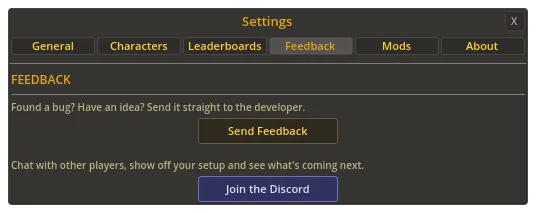
The shop has a Buy / Sell switch at the top. Sell shows everything in your bank the merchant will buy, with the big shop icons, the price on each item and your bank’s total value. Click an item to sell the amount picked on the quantity bar. The first sale of each item on a visit asks you to confirm.
Each section also has a Sell all button, and it is careful about what it keeps: your rare finds (anything from a rare drop table, or worth 5,000 gold or more each), the food in your auto-eat slots, the food and potions you have in use, whatever your current recipe uses, your selected spells’ runes, and your equipped arrows, bolts and tar. It asks twice, once with the gold total and once more naming what goes, since a sale can’t be undone. Spare gear sells one click at a time. The shop is also as wide as the bank now, with its buy sections in two columns.
Fewer clicks
- Picking a skill puts the skill grid and menu away and opens that skill’s picker, with your last choice highlighted. Switching skill and recipe went from six clicks to four. The skill icon on the XP bar opens the skill grid, so it’s three from there.
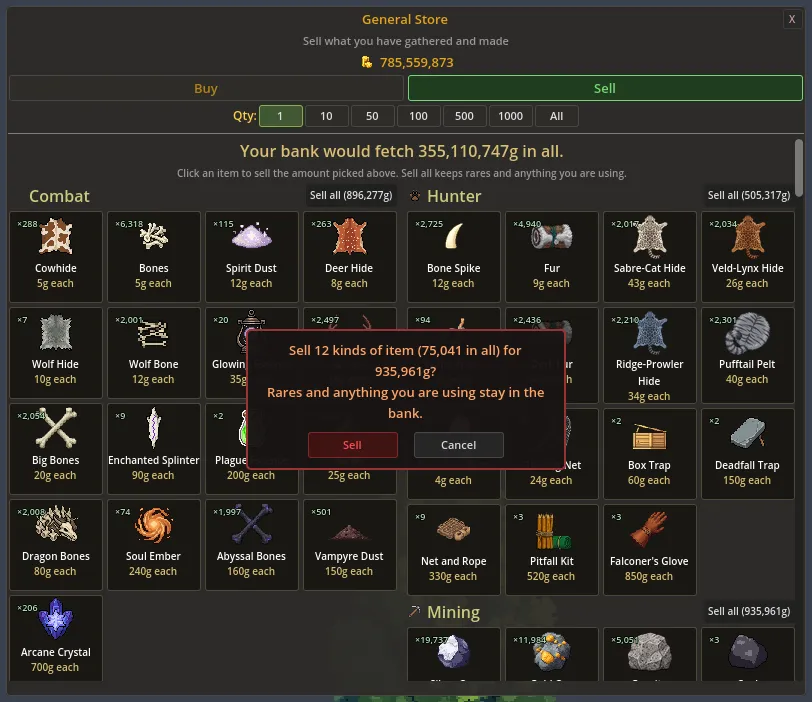
- When you run out of materials mid-craft, a row of buy buttons shows right under the recipe box. It names what it buys and offers from 10 up to 50,000 more crafts’ worth, showing the amounts you can afford. The big amounts ask for a second click. The recipe picker has Buy for 10 more and Buy for 50 more buttons too.
- The Slayer console has a red button under your task that names your monster, like Fight Wolf. It switches to the combat style you last used and targets the task monster. If you can’t fight it yet, the button says why.
- The Farming crop picker can plant your pick in every empty patch at once.
- Right-click any monster in the picker, locked ones included, to open its Guide page. In Stats, clicking a skill trains it and right-clicking opens its Guide chapter.
The game tells you more
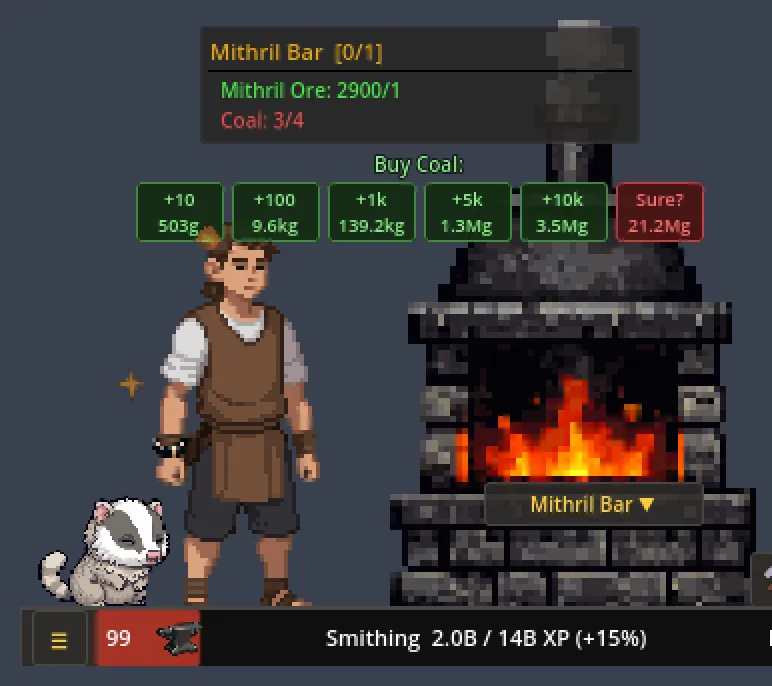
Recipe tooltips show the XP per craft, what you have against what one craft needs, and how many you can make, and that count sits in the corner of every recipe you’ve unlocked, in red at 0. Gathering tooltips show your chance with your level and gear. Each skill’s level shows on its icon in the skill grid. Hovering the XP bar shows what is left to the next level and roughly how many more of your current action that is. A level-up names what it unlocked, like “New: Iron Ore.”
When you run out of materials the game says so once instead of your character just standing there. The production skills also have an option in their picker, Make the next best thing I can, which switches you once to the best recipe you can still make at or below the one that ran out. It never moves you up to a pricier one, and it’s off by default.
Big moments like level-ups, rare drops and finished Slayer tasks can no longer be pushed off screen by a small message like “Burned!”. Gear in the Equipment panel shows how it compares with what that loadout already wears, with a green arrow on a clear upgrade. Locked achievements show your progress, and unlocking a Steam achievement shows in game too, since Steam’s own popup may not draw over RuneClick.
Loadout hotkeys
Loadout hotkeys now default to Ctrl+Alt+1 to 4, so typing a number in chat or pressing a hotbar key in another game no longer swaps your gear. If you already turned hotkeys on or picked your own keys, they keep working exactly as before. Restore Defaults now asks for a second click, because it also resets your hotkeys.
Three new Magic robe sets
Magic’s armor used to stop at the Mystic robes at level 40. Three sets continue it now: Sorcerer at 50, crafted from enchanted cloth, thread and chaos runes; Arcanist at 60, a rare drop from the Chaos Druid and the Aberrant Spectre; and Archmage at 70, a rare drop from the Vampyre and the Chaos Elemental.


Balance
- Ranged was the slowest combat skill to 99 by a wide margin. Bows and crossbows can be used sooner (Willow at 10, was 15; Magic at 60, was 70), and Ranged now gives the same XP per point of damage as Melee.
- Thieving reaches its best success rate within 10 levels of a mark’s unlock instead of 25, so every new mark is worth moving to. XP per steal is lower to match, so the time to 99 stays about the same, and gold per hour at 99 is about where it was.
- Cooking: salmon, lobster and swordfish give more XP, so each new fish beats the last. Trout used to be the best from level 10 all the way to 80.
- Smithing forging now gives the same XP per input as smelting that metal, and Fletching crossbows match the shortbow you unlock at the same level. Both were well behind.
- Magic: the bolt spells hit harder than the strikes, and Siphon heals 7 per combat input, up from 2.
- Farming and Herblore: the rare seeds and herbs turn up far more often when you identify them. Thornstar seeds about 40 times as often. The Giant Squirrel is about 6 times as likely and the Sproutling 4 times.
- Enchanted onyx bolts now drop in stacks of 10 to 15 from the Abyssal Lord and the Chaos Elemental. Cutting an onyx into bolt tips is gone: it turned a gem worth over seven million into fifteen bolts.
Prices got a pass too (gem bolts are priced from what goes into them, hide armor sells in tier order, salamanders sell), and Master Thief and Mass Production now take 100,000 instead of 10,000. If you already have them, you keep them.
Feel
Monsters flash white when you hit them, and you and the monster fade back in after a respawn instead of popping in. Hunter, Agility, Construction, Slayer and Spellcraft have their own ambient effects instead of fireflies. The Abyssal Lord and the Chaos Elemental take on a tint for the combat style of their current phase, and killing a boss, finishing a Slayer task or finishing a build sets off a celebration. An enchanted bolt’s effect shows when it goes off, and a diseased crop wilts in its patch. If you want mining rocks to take a small knock on each strike, turn on Mining Rock Knock in Settings.
Art
New poses: you kneel to chisel limestone and granite, stir a bowl for the doughs, pies and battas (they used the frying pan), and fit the fletching to a short metal bolt when making bolts. Your jewelry follows every new pose.
Gem cutting shows the gem you are actually working, each in its own color.
The people you steal from turn on you when you’re caught. They point, or the guard levels his spear, and they hold it until you can steal again.
Agility, Hunter, Prayer, Spellcraft, Thieving and Attack are redrawn to match the original skill icons, and the blood, death and soul runes now match the other runes.


The Goblin Chief, the Ogre Chieftain and the Plague King each have a second attack. Hunter creatures and the Cooking stove are drawn at their on-screen size, so their pixels stop shimmering as they move. A grown herb is a full bed with blossoms in that herb’s color. And potions fill their slot, with super potions in a square gold-ringed bottle so you can tell them from the regular ones.


And the rest
The first switch to a combat style after starting the game could freeze it for a moment while the combat art loaded; that art now loads in the background right after launch. A full pass over item, monster, spell and Guide text brings it in line with how the game actually works. Saves carry over unchanged, and everything new is translated into all eight languages.
The full notes for 3.1 are on Steam, with every number.
And then 3.1.1
Two days later, a small one built from the first message anyone ever sent through the in-game feedback button. Thank you, Toasted. Both of your ideas are in.
Mirror Scene is a new option in Settings that flips the whole layout. Your character stands on the right facing left, and the props, monsters and your pet move to the left. The bars, damage numbers, drops and combat buttons follow, the menu button moves to the right end of the bar, and the menu and skill grid open from the right. It’s off unless you turn it on, and it switches over straight away.
The skill grid stays open again after you pick a skill, so you can hop between skills without reopening it each time. If you liked the tidier 3.1.0 way, turn on Close Skill Grid After Picking in Settings. And with a controller plugged in, a D-pad press or a drifting stick could move the feedback window’s focus to Send, so your message went out half-written. The feedback window now ignores controllers. If something you sent got cut off, send it again.
Keep the feedback coming. It’s in Settings > Feedback, and every message gets read. The notes for 3.1.1 are on Steam.
— Vosk